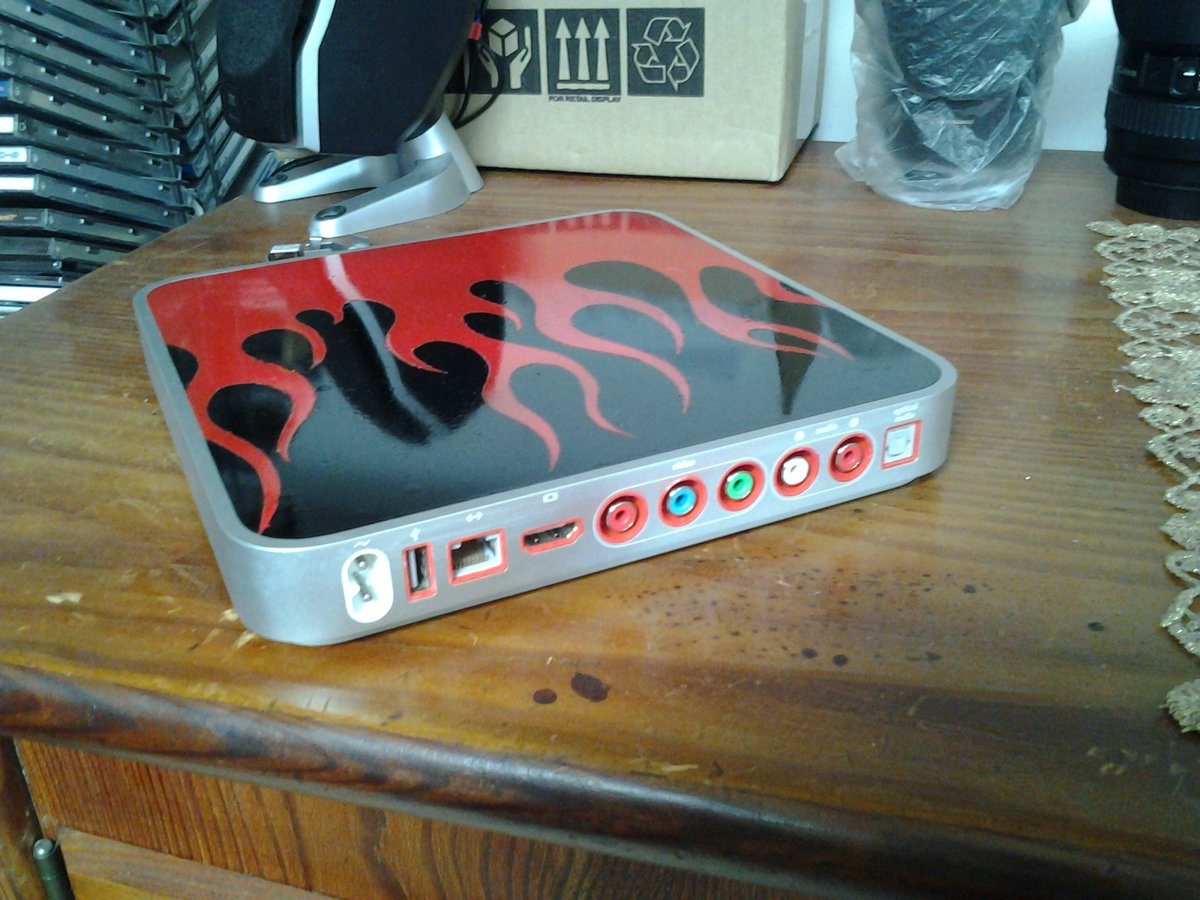
The First generation Apple TV — affectionately known to enthusiasts as the "silver" or "original" Apple TV — occupies a unique, almost mythical space in Apple's hardware history. Released in 2007, it wasn't just a simple streaming box; it was a compact computer running a modified version of macOS. This distinct architecture made it a prime target for modding, hacking, and custom firmwares for Apple TV 1st Generation, transforming it from a niche media player into a versatile home media server long before such devices became commonplace.
At a Glance: Understanding Apple TV 1st Gen Modding
- A Different Beast: The 1st Gen Apple TV runs a stripped-down macOS, not tvOS, and includes an internal hard drive, making its "modding" journey fundamentally different from later models.
- The Goal: Unleash Potential: Users primarily modded it to install full-fledged media center software like XBMC (now Kodi), expanding its capabilities far beyond Apple's original vision.
- More Than Just Apps: Modding often involved hardware upgrades (like SSDs) and installing alternative operating systems (e.g., Linux-based distributions).
- A Historical Endeavor: While fascinating from a historical perspective, acquiring and modding a 1st Gen Apple TV today isn't recommended for practical media consumption, as modern, cheaper, and more powerful alternatives abound.
- Later Generations Differ: Be aware that "jailbreaking" tools like Palera1n, Checkra1n, Unc0ver, and Seas0npass mentioned in general Apple TV hacking discussions are for newer Apple TV models (2nd Gen onwards) and do not apply to the 1st Gen.
The Genesis of a Gimmick: What Made the 1st Gen Apple TV Unique?
When Apple unveiled the original Apple TV, it was a curious departure from their typical product line. Instead of a lightweight, app-driven interface we know today, this device shipped with an Intel Pentium M processor, 256MB of RAM, a modest NVIDIA GeForce Go 7300 GPU, and an actual hard drive (either 40GB or 160GB). It wasn't just a media streamer; it was a full-blown, albeit simplified, Mac Mini.
This hardware foundation meant it didn't run what we now call "tvOS." Instead, it ran a modified version of Mac OS X Tiger 10.4, which was later updated to a more Leopard-esque UI. This Unix-based core, coupled with an easily accessible internal hard drive, presented a tantalizing playground for tinkerers and developers eager to push its limits beyond just syncing with iTunes.
Why Bother with a Relic? The Allure of Custom Firmware
In an era before widespread smart TVs, Roku, Fire Stick, and modern Apple TV models, the original Apple TV offered a glimpse into a connected media future. However, its out-of-the-box functionality was quite restrictive. You were largely confined to iTunes content, podcasts, and YouTube.
Here's why people dove headfirst into the world of custom firmwares and hacks:
- XBMC/Kodi Integration: This was, by far, the biggest draw. Installing XBMC (the predecessor to Kodi) turned the Apple TV into a comprehensive, open-source media center capable of playing almost any video or audio format imaginable, streaming from local network shares, and accessing a vast ecosystem of community-developed add-ons. It was a complete liberation from iTunes' confines.
- Expanded Media Format Support: The stock Apple TV was picky. Custom firmwares and alternative operating systems removed these limitations, allowing users to play virtually any video codec or container file.
- Network Streaming Powerhouse: With XBMC, users could easily browse and stream content directly from network-attached storage (NAS) devices or shared folders on their home computers, making it a true hub for locally stored media.
- Hardware Upgrades: The physical hard drive could be swapped for a larger one, or even an SSD for faster boot times and a snappier interface, a modification impossible on later, flash-storage-only models.
- Cost-Effective Media Center (at the time): Before the explosion of cheap streaming sticks, turning an existing Apple TV into a powerful XBMC box was a compelling alternative to building a dedicated Home Theater PC (HTPC).
- Preserving Hardware & Reducing E-Waste: For many, modding was about extending the life of perfectly capable hardware, giving it new purpose rather than letting it gather dust in a drawer.
Hacking the Hard Drive: A Different Kind of Jailbreak
Unlike the "jailbreaking" methods seen on later tvOS devices (which primarily involve software exploits to gain root access), modding the 1st Gen Apple TV often felt more akin to hacking a small Linux PC. There wasn't a "tvOS" to bypass; instead, the process typically involved directly manipulating the underlying macOS installation or replacing it entirely.
The common methods for "modding" an Apple TV 1st Gen included:
- Hard Drive Manipulation: Since it had a physical hard drive, users could connect it to a computer, repartition it, install new operating systems, or boot directly from a USB drive.
- Custom Bootloaders: Tools like
atv-bootloaderwere essential. These bootloaders allowed the Apple TV to boot into alternative operating systems (like various Linux distributions tailored for media centers) instead of its default Apple OS. - Installing Linux-Based Media OSes: Distributions like Crystalbuntu (a highly optimized Ubuntu build) and later OpenELEC/LibreELEC were incredibly popular. These offered a lightweight, performant base specifically designed to run XBMC/Kodi. The goal was always a seamless, dedicated media experience.
- Simple Software Patches: Some less intrusive mods involved installing third-party applications (like
nitoTVfor basic app access) within the original Apple OS, but these were generally limited compared to a full OS overhaul.
The process often involved:
- Disassembling the Apple TV: To access the hard drive for replacement or direct manipulation.
- Preparing a Bootable USB Drive: With a custom bootloader and the desired Linux distribution (e.g., Crystalbuntu, XBMC Live).
- Booting and Installing: Guiding the Apple TV to boot from the USB and install the new OS onto its internal hard drive.
- Configuration: Setting up XBMC/Kodi, network shares, and other customizations.
This hands-on, hardware-centric approach is a stark contrast to the purely software-based jailbreaks found on subsequent Apple TV generations. For the 1st Gen, the phrase "custom firmware" often meant a completely different operating system, purpose-built for media.
The Crown Jewel: XBMC (Kodi) on Your Vintage Apple TV
XBMC (now Kodi) was the undisputed king of custom firmwares for the 1st Gen Apple TV. Imagine a single interface where you could:
- Browse and Play Local Media: Seamlessly access movies, TV shows, and music stored on your network, complete with rich metadata, cover art, and fan art.
- Stream Online Content: Through various community add-ons, stream content from a myriad of online sources (though the legality and availability of these varied).
- Customize Everything: Change skins, themes, menu layouts, and add powerful visualization tools.
- Listen to Music: A full-featured music player with library management and equalizer controls.
- View Photos: Turn your TV into a digital picture frame with custom slideshows.
For a device from 2007, running a fully-fledged XBMC installation was revolutionary, transforming it into a smart media center years ahead of its time.
Beyond the First Gen: A Glimpse into Later Apple TV Jailbreaking
While the 1st Gen Apple TV stood alone with its macOS core, subsequent Apple TV models transitioned to iOS-based software, eventually becoming tvOS. This shift introduced the concept of "jailbreaking" in the more familiar iOS sense: exploiting vulnerabilities in the software to gain root access, allowing for the installation of unsigned applications and tweaks without replacing the entire operating system.
It's crucial to understand that the following tools and methods apply to Apple TV 2nd Generation and newer, and are not compatible with the Apple TV 1st Generation. However, understanding them provides context for the evolution of Apple TV customization.
Jailbreaking Apple TV 2nd & 3rd Generations: Tethered & Untethered Days
The 2nd and 3rd generation Apple TVs (A1378 and A1427/A1469 respectively) were among the earliest tvOS devices to see widespread jailbreaking.
- Seas0npass Jailbreak (Apple TV 2nd Gen): This was a prominent tool for the Apple TV 2, offering both untethered jailbreaks for older firmwares (tvOS 4.3 – tvOS 5.3) and tethered boots for newer ones (tvOS 6.1.2). Tethered meant the device needed to be connected to a computer to boot up after a power cycle. Seas0npass made it relatively straightforward: connect via micro-USB, run the tool, and follow prompts to put the device into DFU mode. The primary goal here was often to install
nitoTVand, subsequently, XBMC/Kodi. - Blackb0x Jailbreak (Apple TV 2nd & 3rd Gen): Based on the
checkm8exploit (a hardware-based bootrom exploit, similar to what Checkra1n uses), Blackb0x specifically targeted older Apple TV models, including the 2nd (A1378) and 3rd (A1427/A1469) generations. It offered untethered jailbreaks for tvOS 8.4.x on 3rd Gen and untethered for tvOS 6.1.4 on 2nd Gen. The process involved connecting the Apple TV to a Mac via micro-USB, running the Blackb0x application, and entering DFU mode. The result was usually Kodi appearing on the home screen. - EtasonATV: Mentioned as the first public ATV3 jailbreak, its IPA was not widely released, indicating the difficulty and rarity of 3rd Gen jailbreaks due to stronger security.
Modern Jailbreaking: Apple TV 4th Gen, 4K, and HD (tvOS Era)
As Apple TVs evolved, so did their operating system (tvOS) and the complexity of jailbreaking. These methods typically involve sideloading an "app" that performs the jailbreak, often requiring a computer (Mac for Xcode or Cydia Impactor) and an Apple Developer account (free or paid).
- Pangu9 Jailbreak (Apple TV 4th Gen, tvOS 9.0 – 9.0.1): One of the earlier comprehensive jailbreaks for the 4th Gen, it was a complex process requiring a Mac, Xcode, C-type USB cable, and an Apple development membership. Users would use Xcode to install the Pangu jailbreak app onto the Apple TV, then run it to complete the jailbreak.
- LiberTV Jailbreak (Apple TV 4th/4K, tvOS 9.1 – 11.1): Developed by Jonathan Levin, LiberTV supported various tvOS versions across the 4th Gen and early 4K models. It typically involved sideloading the LiberTV IPA using Cydia Impactor (for 4th Gen) or Xcode (for 4K) and then running the app on the Apple TV to initiate the jailbreak.
- GreenG0blin Jailbreak (Apple TV 4th Gen, tvOS 10.2.2): Similar to LiberTV, this jailbreak required sideloading the greeng0blin IPA via Cydia Impactor and running the app directly on the Apple TV to achieve root access.
- ElectraTV Jailbreak (Apple TV 4th/5th Gen, tvOS 11.2 – 11.3.1): Part of the broader Electra jailbreak family, ElectraTV followed the pattern of sideloading an IPA (using Cydia Impactor) and launching the app on the Apple TV to execute the jailbreak.
- ChimeraTV Jailbreak (Apple TV 4th/4K, tvOS 12.0 – 12.4): From the Sileo team, ChimeraTV expanded support for tvOS 12.x. Users would sideload its IPA with Cydia Impactor and run it on the device to complete the jailbreak, often requiring multiple attempts.
- Unc0ver Jailbreak (Apple TV 4K, tvOS 13.0 – 13.5): A popular jailbreak for iOS devices, Unc0ver also supported specific tvOS versions on the Apple TV 4K. This was a more involved sideloading process, often leveraging Xcode and requiring an Apple Developer Account to sign the unc0verTV IPA before installation. Post-jailbreak,
nitoTVwould appear, and SSH access (passwordalpine) was often enabled. - Checkra1n Jailbreak (Apple TV 4th Gen/4K, tvOS 13 – 14): Utilizing the unpatchable
checkm8bootrom exploit, Checkra1n offered a robust, albeit tethered (for certain devices/versions), jailbreak for a range of Apple TV models and tvOS versions. It typically involved connecting the Apple TV to a Mac and running the Checkra1n app, putting the device into DFU mode during the process. - Palera1n Jailbreak (Apple TV HD, tvOS 15 – 18.1): Continuing the
checkm8legacy, Palera1n extended jailbreaking capabilities to the Apple TV HD (4th Gen) for even newer tvOS versions. This often involved command-line steps in Terminal (e.g.,chmod +x,xattr -cr,./Jb -f –cli), and putting the device into DFU mode.
Each of these later jailbreaks aimed to open up the tvOS ecosystem, allowing users to install unofficial apps (like Kodi), access file systems, customize interfaces, and integrate with third-party services not sanctioned by Apple. The benefits are similar in spirit to 1st Gen modding – enhanced media capabilities, customization, and greater control – but the underlying technical approaches are vastly different.
The Pitfalls and Practicalities of Vintage Modding
Embarking on a modding journey for any older device, especially something like the 1st Gen Apple TV, comes with its own set of challenges:
- Hardware Deterioration: These devices are over 15 years old. Hard drives can fail, fans can get noisy, and power supplies can degrade.
- Scarcity of Parts: Finding replacement components can be difficult and expensive.
- Software Obscurity: The communities and specific software builds (like Crystalbuntu) that supported the 1st Gen are largely inactive. Finding reliable download links, guides, and troubleshooting help can be a significant hurdle.
- Lack of Modern Codecs/Performance: While XBMC was powerful, the 1st Gen's hardware struggles with modern high-bitrate video formats (e.g., H.265/HEVC, 4K). HD playback can also be inconsistent.
- Security Concerns: Running very old operating systems and media server software without modern security updates can pose risks if exposed to the internet.
- Time Commitment: This is not a plug-and-play solution. Be prepared to invest significant time in research, assembly, installation, and troubleshooting.
Is It Worth It Today? Weighing Your Options
The short answer, as echoed by many experts, is generally no, it's not worth purchasing an old Apple TV 1st Generation specifically for modding today.
While the journey of modding one of these vintage machines is a rewarding technical challenge and a fascinating dive into computing history, for practical media consumption, modern alternatives offer a vastly superior experience:
- Cheaper Alternatives: Devices like a Roku Express, Amazon Fire Stick, or even a newer generation Apple TV (HD or 4K) are often cheaper, faster, and more energy-efficient.
- Modern Features: They support 4K HDR, Dolby Vision, advanced audio formats, and a seamless app ecosystem with official support for all major streaming services.
- Ease of Use: Plug-and-play setup, automatic updates, and user-friendly interfaces make them accessible to everyone.
- Better Performance: Dedicated hardware for video decoding means smoother playback and a snappier user experience.
However, if you happen to already own a 1st Gen Apple TV sitting in a closet, and you're an avid tinkerer with an interest in retro computing or learning about embedded systems, then modding it can be a delightful project. Consider it a hobbyist's endeavor rather than a practical upgrade for your home theater.
Your Next Steps for a Modded Media Experience
If the allure of customization still calls to you, regardless of the generation, here’s how to approach it:
- Identify Your Apple TV Model: This is paramount. The 1st Gen is a metal case with a hard drive. Later generations are black, smaller, and run tvOS. Your model dictates which modding or jailbreaking methods, if any, are applicable.
- For 1st Gen Enthusiasts:
- Embrace the Journey: Understand that this is a historical project. You’ll be dealing with vintage hardware and software.
- Community Forums: Seek out archival information on forums like MacRumors, Kodi forums, or other enthusiast sites that might still host old guides for Crystalbuntu, atv-bootloader, or XBMC Live.
- Hardware Check: Before you begin, assess the condition of your 1st Gen Apple TV. Does it power on? Is the hard drive healthy?
- For Later Gen Apple TV Users:
- Verify tvOS Version: Jailbreak tools are highly specific to tvOS versions and device models. Always check compatibility before attempting anything.
- Consult Up-to-Date Guides: Due to constant changes in Apple's security and jailbreak methods, always look for the most current guides from reputable jailbreaking communities (e.g., r/jailbreak, r/tvOSBeta) to ensure you're using the correct tools and steps.
- Understand Risks: Jailbreaking can void warranties, potentially brick your device if done incorrectly, and may expose you to security vulnerabilities if not managed carefully.
- Backup Your Device: Always back up your Apple TV before attempting any jailbreak.
Whether you're reviving a classic 1st Gen Apple TV with a Linux-based media server or exploring the possibilities of jailbreaking a modern tvOS device, the world of custom firmwares offers a compelling alternative to Apple's default ecosystem. Just be prepared for the adventure, the learning curve, and the occasional hiccup along the way.